Often in-between work on major features (e.g. AI), we take a beat to work on all the great ideas that customers and partners have come up with, as well as squashing some bugs that have been reported.
This month’s release is one of those – some nice usability improvements and important bugfixes.
New Features
Workflow button improvements
When you run a workflow by clicking a button, what happens afterwards? Maybe the page will refresh, or if the workflow created a record, the system opens that record for viewing.
However, what happens in any particular case may not be exactly what you want. So now it’s customisable.
Every workflow step in a chain has a new option
Show the table when workflow chain completes
If that workflow step either creates a new record, or updates an existing one, ticking that option means the user interface will navigate to that record when the workflow is done. Only one view in a workflow chain can have the option set.
Various people have requested this over the past few months so we’re glad to get it released.
Extra navigation shortcuts
When a view is open containing data records (e.g. a list of people), clicking on a record will open that record. But, views often contain data from not just one table but multiple. Our list of people might contain the names of the organisations they work at for example.
A recent request was to be able to jump quickly to these other records, from the view.
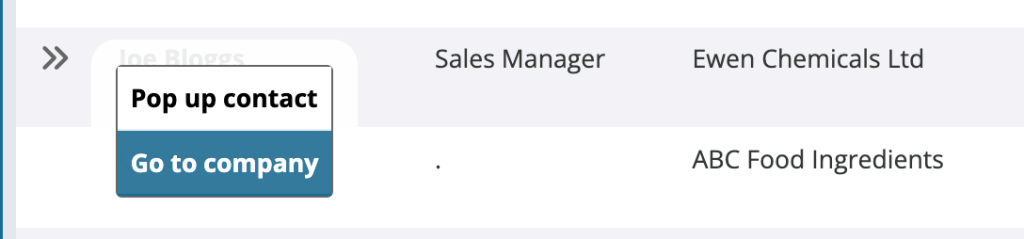
This feature was already there, for records in a tab, but we’ve now added it to all views. Here’s what it looks like:
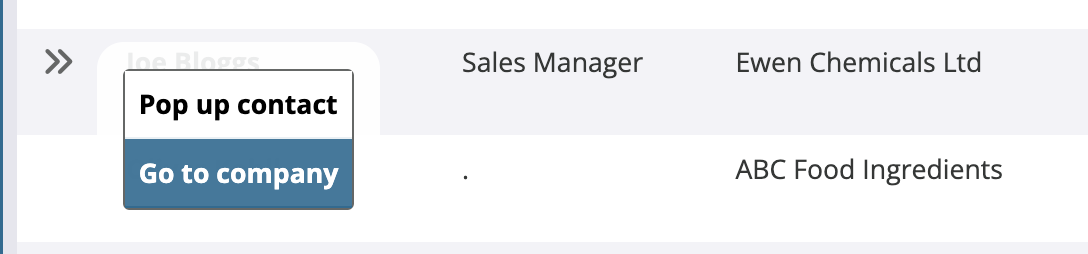
The ‘pop up’ option will be offered for the main record – to pop it up for editing in a floating panel. You can go to the main record full screen by just clicking anywhere else in the row, as normal.
Thanks to Tom from TES for this suggestion.
Automatic table re-locking
Locked records in tables can’t be edited without special permissions. This may be turned on for important records like invoices which have already been sent to customers for example.
As always though, there are exceptions and sometimes you may wish to let people edit records to correct a mistake. For those occasions, locking can be turned off in the table options.
The request here was for the system to automatically re-enable locking, if the administrator forgot to later turn it back on. That’s now done.
The way it works is that if there are any workflows which lock records, which act on tables which *aren’t* lockable, then once a day, locking will be enabled for those tables. To permanently prevent locking, disable the workflows.
Thanks to Neil from Lewis Pies for that request.
Prevent formatting in text boxes
Large text boxes let you format content, for example make text bold or italic, add headings and bullet points. Sometimes though, in particular cases, you may want to restrict what people can enter to just plain text, for example when output may be printed on labels or exported to other systems.
You can now choose that by editing the field options.
Bug fixes
Newlines in exports
In spreadsheet exports, multi-line text fields weren’t being exported with the linebreaks, rather with the text ‘\n’. That’s fixed and thanks to Cathy from Castell Howell Foods for reporting.
Workflow triggering
There was a bug that meant timed workflows, i.e. those that run every 5 minutes, half an hour, hour etc. were very occasionally being triggered incorrectly. (This occurred for workflows that only get triggered if there’s a change to the data which affects them and some types of change weren’t being detected).
Thanks to Kim from Britannia Windows for initially reporting this.
Calculation grouping errors
In some special cases, particular calculations couldn’t be added to views. Thanks to Alex from Bath & West Community Energy for reporting.
Calculations sometimes had the text “:: float AS [id]” appended to them when editing, which caused updating views to fail. Thanks to Richard Wilson from Little House Consulting for reporting
Tab menus could sometimes be shown with some text cut off by the edge of the screen. Thanks to Alex again.
Many other more minor improvements and fixes have also been made.
To add your requests to our list, just get in touch!
 Platform Updates
Leave a comment