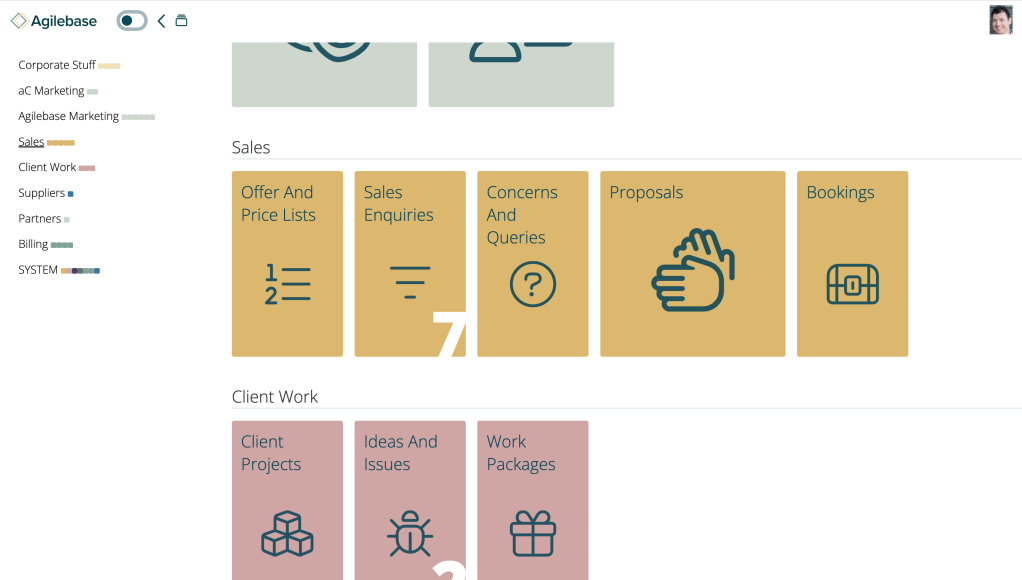
You may notice a very visible new feature when you log in to Agilebase, at least if you have lots of tiles in sections on the homepage.

On the left hand side of the screen, a navigation menu appears. Clicking a name (e.g. ‘Sales’ in the screenshot) will take you directly to that section of tiles. It’s like a table of contents in a document.
For those whose brains work more visually, a mini-representation of the tiles is shown next to each section name in the navigation, as little coloured boxes. This is inspired by the ‘minimap’ feature of the Sublime Text editor https://www.sublimetext.com/. I personally find it quite useful to be able to navigate via colours that way.
Clicking the Agilebase logo above the list of sections will scroll to the top of the screen.
The sections navigation will only appear if you have four or more sections of tiles.
If you’re not yet using sections and you want to, you can set them up by editing tiles: https://docs.agilebase.co.uk/docs/tiles/
Thanks to Gemma (https://marriagebristol.com/) for helping with the design and Elliott with coding (https://weblake.co.uk/)
We hope you find this useful – as always, please feedback your thoughts.
 Platform Updates
Leave a comment