When programming, it’s actually quite unusual to come across a requirement that is intellectually interesting to work on. Most are something along the lines of ‘grr, why doesn’t this bit of code work, I can’t see anything wrong with it?’ or ‘I need to add another option into this settings screen and plug it in to all the different layers of the application, oh joy’ etc.
So much so that when I did come across a theoretical puzzle type problem last week, I didn’t Google for any solutions on purpose, as I wanted the stimulation of solving it myself.
Caveating that, I suppose some fields or types of coding may be more mathematical than others. SQL often throws up some nice ‘how would you do that’ questions, perhaps because it’s not a general purpose language.
In fact, Agilebase, the No-Code platform that we develop, is in large parts building SQL databases and views, just with a drag and drop front end rather than by using code. That means that although people don’t have to learn the syntax of a particular programming language to create apps, often they’re doing very advanced things which are definitely exercising their brains. I love that.
Maybe some of those things are a topic for another blog post.
Anyway, back to the problem in hand.
In Agilebase, we have database tables, with role based privileges controlling access. For example, we may have tables
- Organisations
- Sales Enquiries
- Invoices
and roles
- Account Managers, which gives access to Organisations and Sales Enquiries
- Sales People, which gives access to Sales Enquiries
- Accounts, which gives access to Organisations and Invoices
You could think of other analogous situations, for example, different categories of vehicle and different types of driving licence which allows you to drive them. Since I’m not feeling particularly creative, and for simplicity, I’m just going to call them tables A, B, C, … and roles x,y,z, …
Now in Agilebase (and in SQL), you can create views which pull together data from multiple tables. For example, a reporting view may pull in the organisation name, the average length of time a sales enquiry lasts for and their last quarter’s sales figures. (I don’t know why, it’s just an example I’m making up as I go along). To access that view, people need privileges to see all the constituent parts.
The question is, what is the simplest (smallest) set of roles which you can assign to a person to let them have access to all that data?
That’s often a very useful thing to know. When building a view, you want to know how to let people see it, or troubleshoot why they can’t, in a simple fashion.
This is beginning to sound a little like a brain teaser, something like how do you get a fox, a chicken and a sack of grain across a river in a boat which will carry only one. How would you solve it?
One way to start would be to find all roles which give privileges on any of the tables, then add them to a list one at a time. If and when you have a set which gives privileges on all necessary tables, stop there. It may not be an optimal list, e.g. depending on what order you add them, you may come up with a list of 5 roles, where 3 different ones would have done.
Also, thinking about it, as there could be many different combinations of roles which satisfy the need, you don’t want to show just one to the user, but actually all the options, or if there are lots, maybe just the ‘best’ few initially.
My next thought then is to enumerate all the possible combinations, then later on work out how to tell which are ‘best’.
So, to output all combinations, we can use something called a cartesian product. To write down a simple example again, say we have
- A -> x, y
- B -> z
- C -> x, z
where A, B, C are our tables and x, y, z the roles which grant privileges on them. x and y grant privileges on table A for example.
To get the cartesian product of those sets of roles, we simply ‘multiply’ them out, or look at them vertically. The roles are then
(x, y) (z) (x, z) producing combinations
- xzx
- xzz
- yzx
- yzz
Those are all role combinations which grant privileges on all tables A, B, C, or any view containing data from all of them.
Of course, it makes no sense to add a role twice to someone, so we can simplify that to
- xz
- xz
- yzx
- yz
and we can remove duplicates. The order of roles doesn’t make any difference either, so if there were groups with different orderings we could cut some of them out too. In our example, we can reduce down to
- xz
- yzx
- yz
That’s great, I thought. We have some unique sets of roles, we can show them to the developer and let them pick whatever’s the most appropriate for any user in question.
You may notice that yzx would never be necessary – e.g. as yz is one of the other combinations, adding an extra role is just spurious, in fact misleading to our developer. We’re trying to show minimum numbers of roles. Going back to our idea from the start, we could keep only the shortest sets, discarding any longer.
Feeling slightly optimistic that this would work well, but wanting to give it a go on real data, I tried it out on a system with quite a lot of tables and roles. It quickly became apparent that some more work was necessary.
One example problem is that in many systems, there is an ‘administrator’ role which gives access to all or most tables. Calling that ‘a’, our example table to role mappings would be
- A -> x, y, a
- B -> z, a
- C -> x, z, a
Following the steps above, from (x, y, a) (z, a) (x, z, a) produces final combinations
- xz
- xza
- xa
- xaz
- yzx
- yz
- yza
- azx
- az
- a
This has a couple of problems. The shortest set of roles is just ‘a’, and while that is indeed a valid option – you could grant a user administrative privileges in order to see any particular view, it’s not something you’d typically do for more than one or two people, so isn’t very useful to show.
Secondly, just like yzx would never be necessary above, anything with ‘a’ in it is probably not necessary if the other roles in the group provide enough privileges (plus just ‘a’ on it’s own is one of the options anyway). It’s obviously a general problem which needs to be addressed.
How do we do that?
Well we can remove any groups that contain subsets that are themselves in the list. For example, taking the first two from the above list, xza contains xz, so we can discard xza. In fact it also contains various others, including just ‘a’, so we can discard it for multiple reasons. What does that give us?
- xz
- yz
- a
That looks good – a nice short, consumable list. Now we need a more advanced way of ordering them though, we don’t want to take the shortest first, as that just gives us our ‘trivial’ answer of the administrator role (in this example).
What I came up with was to sort by a score for each group, being the number of users the roles in the group contain, divided by the number of roles in the group, i.e. the average users per role. That rewards those roles which are ‘most commonly used’, whilst also rewarding small group sizes. Trying it out on one or two examples, it seems to work well.
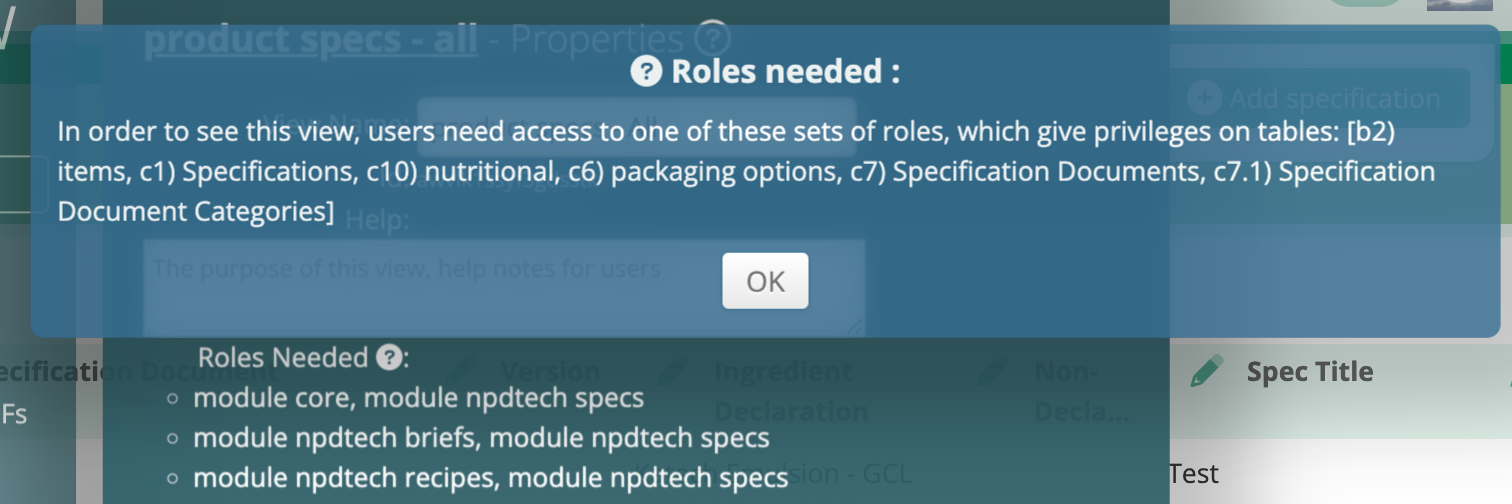
That’s good enough for me for now. I’ll try it out in the real world on our test servers for a bit and see if it’s able to be released.
The top role set there, ‘module core, module npdtech specs’ is actually the best for this real-life example.
Well, that’s a peek into what’s going through my perhaps odd mind as I’m enjoying solving a coding problem.
If you’ve a better way of doing this by the way, or I’ve overlooked some flaw in the logic, please let me know.
 Platform Updates
Leave a comment