(BOMs and other recursive data structures)
What’s a BOM? It stands for Bill Of Materials and basically means a list of the constituent parts of something. It’s one of the types of data structure that can be built in Agilebase.
The interesting thing about BOMs is they can be recursive, i.e. self-referencing. Here are a few examples:
Take an aeroplane. It may consist of a fuselage, wings, a tail, nose etc. The fuselage may contain panels, rivets, an interior which consists of a floor, seats etc. each of which in turn has a myriad of other parts. (I’m only guessing, I know nothing about aeroplane design!)
If each item has a cost and weight associated with it, if you add all those up, you have the total cost and weight of the entire plane.
Another example would be ingredients in a recipe. A bolognese may itself be a recipe containing pasta and sauce. The pasta may contain durum wheat, the sauce may contain tomato paste, oregano etc. The tomato paste may contain tomatoes, olive oil, salt etc.
A third could be not physical items, but a task list. Each primary task (construct a concert hall), may contain tasks for hiring, budgeting, design, build etc., each of which break down into sub-tasks which themselves break down further.
Displaying graphically
What we’ve just built into Agilebase, as a technology test, is an automatic visualisation of these structures.
The feature is currently in beta so is not 100% finished. So far it’s being tested on food recipes.
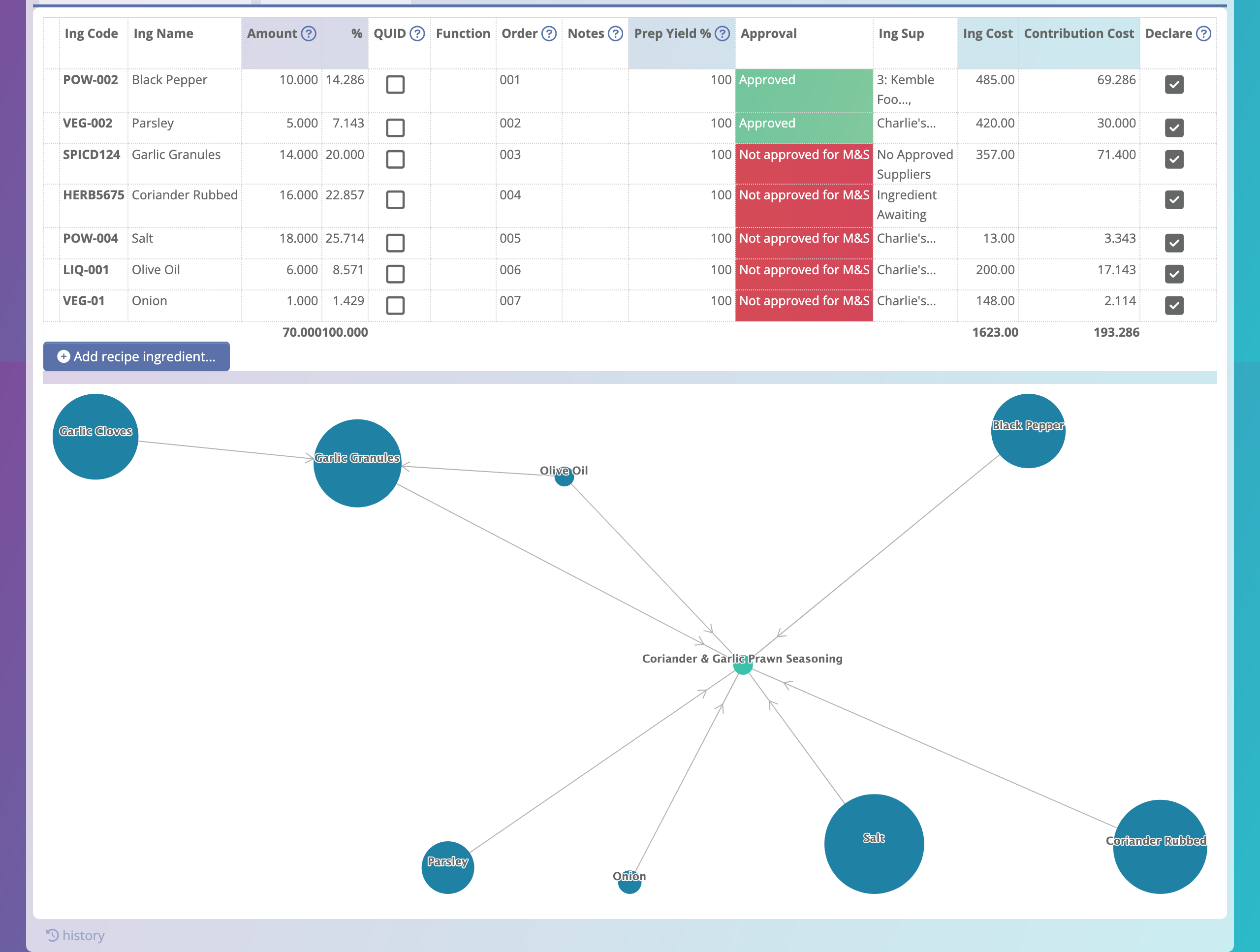
Here’s a very simple example. This recipe contains a number of ingredients – parsley, onion, salt etc. You can see that olive oil is used directly, but is also used in the sub-recipe ‘garlic granules’, which contains garlic cloves and olive oil.
Each ‘blob’ is clickable – it will go through to the record for the ingredient clicked on.
The sizes of the blobs represent the amount used in the recipe, however we have had feedback that perhaps allowing the size to represent other factors, such as cost, might be useful. So we’re continuing to work on making this more configurable.
Setting Up
If you do want to try this out in your own Agilebase system, you’ll need a data structure as follows:
- a table to represent items (e.g. ingredients or components)
- a ‘junction’ table which joins items together. It must contain two relation fields, both pointing to the items table above – one for the parent item, the other for the child. You can add other fields to this table, such as amount or cost.
Once you have those two tables, add a tab to the items table, to let people add new child items.
The full setup may require some more detailed steps. These will be added to the ‘build patterns‘ page in the documentation when this feature is out of beta testing. In the meantime, please contact us for a guided tour of how to set this up for your own use.
 Platform Updates
Leave a comment